Les nouveautés et Tutoriels de Votre Codeur | SEO | Création de site web | Création de logiciel

salam every one, this is a topic from google web master centrale blog: Webmaster level: All

Today we’re rolling out Crawl Error alerts to help keep you informed of the state of your site.

Since Googlebot regularly visits your site, we know when your site exhibits connectivity issues or suddenly spikes in pages returning HTTP error response codes (e.g. 404 File Not Found, 403 Forbidden, 503 Service Unavailable, etc). If your site is timing out or is exhibiting systemic errors when accessed by Googlebot, other visitors to your site might be having the same problem!

When we see such errors, we may send alerts –- in the form of messages in the Webmaster Tools Message Center –- to let you know what we’ve detected. Hopefully, given this increased communication, you can fix potential issues that may otherwise impact your site’s visitors or your site’s presence in search.

As we discussed in our blog post announcing the new Webmaster Tools Crawl Errors feature, we divide crawl errors into two types: Site Errors and URL Errors.

Site Error alerts for major site-wide problems

Site Errors represent an inability to connect to your site, and represent systemic issues rather than problems with specific pages. Here are some issues that might cause Site Errors:
  • Your DNS server is down or misconfigured.
  • Your web server itself is firewalled off.
  • Your web server is refusing connections from Googlebot.
  • Your web server is overloaded, or down.
  • Your site’s robots.txt is inaccessible.
These errors are global to a site, and in theory should never occur for a well-operating site (and don’t occur for the large majority of the sites we crawl). If Googlebot detects any appreciable number of these Site Errors, regardless of the size of your site, we’ll try to notify you in the form of a message in the Message Center:

Example of a Site Error alert
The alert provides the number of errors Googlebot encountered crawling your site, the overall crawl error connection rate for your site, a link to the appropriate section of Webmaster Tools to examine the data more closely, and suggestions as to how to fix the problem.

If your site shows a 100% error rate in one of these categories, it likely means that your site is either down or misconfigured in some way. If your site has an error rate less than 100% in any of these categories, it could just indicate a transient condition, but it could also mean that your site is overloaded or improperly configured. You may want to investigate these issues further, or ask about them on our forum.

We may alert you even if the overall error rate is very low — in our experience a well configured site shouldn’t have any errors in these categories.

URL Error anomaly alerts for potentially less critical issues

Whereas any appreciable number of Site Errors could indicate that your site is misconfigured, overloaded, or simply out of service, URL Errors (pages that return a non-200 HTTP code, or incorrectly return an HTTP 200 code in the case of soft 404 errors) may occur on any well-configured site. Because different sites have different numbers of pages and different numbers of external links, a count of errors that indicates a serious problem for a small site might be entirely normal for a large site.

That’s why for URL Errors we only send alerts when we detect a large spike in the number of errors for any of the five categories of errors (Server error, Soft 404, Access denied, Not found or Not followed). For example, if your site routinely has 100 pages with 404 errors, we won’t alert you if that number fluctuates minimally. However we might notify you when that count reaches a much higher number, say 500 or 1,000. Keep in mind that seeing 404 errors is not always bad, and can be a natural part of a healthy website (see our previous blog post: Do 404s hurt my site?).

A large spike in error count could be because something has changed on your site — perhaps a reconfiguration has changed the permissions for a section of your site, or a new version of a script is crashing regularly, or someone accidentally moved or deleted an entire directory, or a reorganization of your site causes external links to no longer work. It could also just be a transient spike, or could be because of external causes (someone has linked to non-existent pages), so there might not even be a problem; but when we see an unusually large number of errors for your site, we’ll let you know so you can investigate:

Example of a URL Error anomaly alert
The alert describes the category of web errors for which we’ve detected a spike, gives a link to the appropriate section of Webmaster Tools so that you can see what pages we think are problematic, and offers troubleshooting suggestions.

Enable Message forwarding to send alerts to your inbox

We know you’re busy, and that routinely checking Webmaster Tools just to check for new alerts might be something you forget to do. Consider turning on Message forwarding. We’ll send any Webmaster Tools messages to the email address of your choice.

Let us know what you think, and if you have any comments or suggestions on our new alerts please visit our forum.

this is a topic published in 2013... to get contents for your blog or your forum, just contact me at: devnasser@gmail.com
salam every one, this is a topic from google web master centrale blog: Webmaster level: All

Crawl errors is one of the most popular features in Webmaster Tools, and today we’re rolling out some very significant enhancements that will make it even more useful.

We now detect and report many new types of errors. To help make sense of the new data, we’ve split the errors into two parts: site errors and URL errors.

Site Errors

Site errors are errors that aren’t specific to a particular URL—they affect your entire site. These include DNS resolution failures, connectivity issues with your web server, and problems fetching your robots.txt file. We used to report these errors by URL, but that didn’t make a lot of sense because they aren’t specific to individual URLs—in fact, they prevent Googlebot from even requesting a URL! Instead, we now keep track of the failure rates for each type of site-wide error. We’ll also try to send you alerts when these errors become frequent enough that they warrant attention.
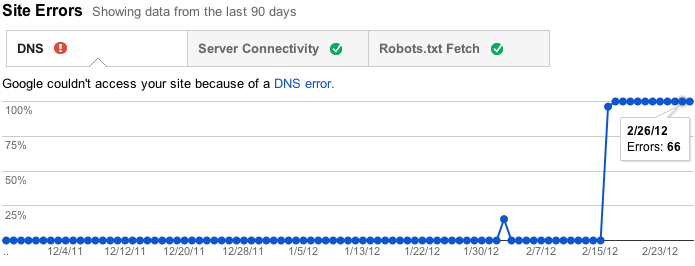
View site error rate and counts over time

Furthermore, if you don’t have (and haven’t recently had) any problems in these areas, as is the case for many sites, we won’t bother you with this section. Instead, we’ll just show you some friendly check marks to let you know everything is hunky-dory.

A site with no recent site-level errors

URL errors

URL errors are errors that are specific to a particular page. This means that when Googlebot tried to crawl the URL, it was able to resolve your DNS, connect to your server, fetch and read your robots.txt file, and then request this URL, but something went wrong after that. We break the URL errors down into various categories based on what caused the error. If your site serves up Google News or mobile (CHTML/XHTML) data, we’ll show separate categories for those errors.

URL errors by type with full current and historical counts

Less is more

We used to show you at most 100,000 errors of each type. Trying to consume all this information was like drinking from a firehose, and you had no way of knowing which of those errors were important (your homepage is down) or less important (someone’s personal site made a typo in a link to your site). There was no realistic way to view all 100,000 errors—no way to sort, search, or mark your progress. In the new version of this feature, we’ve focused on trying to give you only the most important errors up front. For each category, we’ll give you what we think are the 1000 most important and actionable errors.  You can sort and filter these top 1000 errors, let us know when you think you’ve fixed them, and view details about them.
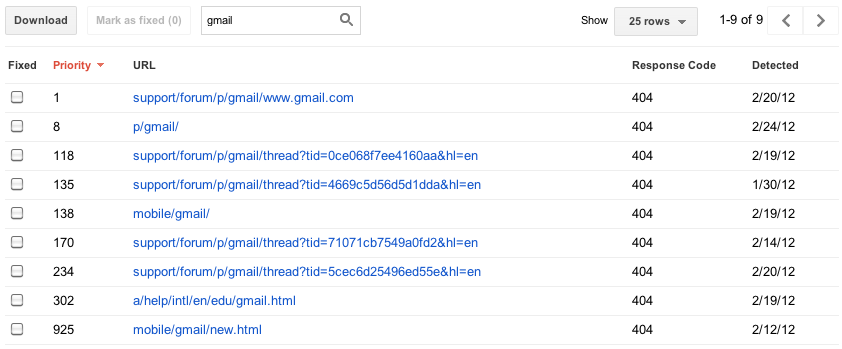
Instantly filter and sort errors on any column

Some sites have more than 1000 errors of a given type, so you’ll still be able to see the total number of errors you have of each type, as well as a graph showing historical data going back 90 days. For those who worry that 1000 error details plus a total aggregate count will not be enough, we’re considering adding programmatic access (an API) to allow you to download every last error you have, so please give us feedback if you need more.

We've also removed the list of pages blocked by robots.txt, because while these can sometimes be useful for diagnosing a problem with your robots.txt file, they are frequently pages you intentionally blocked. We really wanted to focus on errors, so look for information about roboted URLs to show up soon in the "Crawler access" feature under "Site configuration".

Dive into the details

Clicking on an individual error URL from the main list brings up a detail pane with additional information, including when we last tried to crawl the URL, when we first noticed a problem, and a brief explanation of the error.

Details for each URL error

From the details pane you can click on the link for the URL that caused the error to see for yourself what happens when you try to visit it. You can also mark the error as “fixed” (more on that later!), view help content for the error type, list Sitemaps that contain the URL, see other pages that link to this URL, and even have Googlebot fetch the URL right now, either for more information or to double-check that your fix worked.

View pages which link to this URL

Take action!

One thing we’re really excited about in this new version of the Crawl errors feature is that you can really focus on fixing what’s most important first. We’ve ranked the errors so that those at the top of the priority list will be ones where there’s something you can do, whether that’s fixing broken links on your own site, fixing bugs in your server software, updating your Sitemaps to prune dead URLs, or adding a 301 redirect to get users to the “real” page. We determine this based on a multitude of factors, including whether or not you included the URL in a Sitemap, how many places it’s linked from (and if any of those are also on your site), and whether the URL has gotten any traffic recently from search.

Once you think you’ve fixed the issue (you can test your fix by fetching the URL as Googlebot), you can let us know by marking the error as “fixed” if you are a user with full access permissions. This will remove the error from your list.  In the future, the errors you’ve marked as fixed won’t be included in the top errors list, unless we’ve encountered the same error when trying to re-crawl a URL.
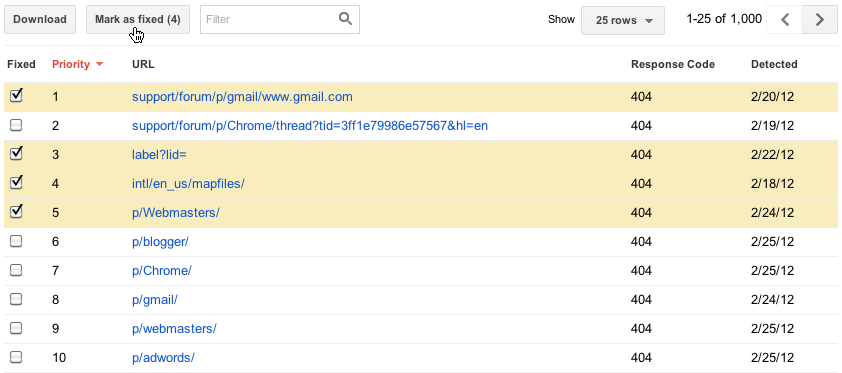
Select errors and mark them as fixed

We’ve put a lot of work into the new Crawl errors feature, so we hope that it will be very useful to you. Let us know what you think and if you have any suggestions, please visit our forum!

this is a topic published in 2013... to get contents for your blog or your forum, just contact me at: devnasser@gmail.com
salam every one, this is a topic from google web master centrale blog: We see two kinds of 404 ("File not found") responses on the web: "hard 404s" and "soft 404s." We discourage the use of so-called "soft 404s" because they can be a confusing experience for users and search engines. Instead of returning a 404 response code for a non-existent URL, websites that serve "soft 404s" return a 200 response code. The content of the 200 response is often the homepage of the site, or an error page.

How does a soft 404 look to the user? Here's a mockup of a soft 404: This site returns a 200 response code and the site's homepage for URLs that don't exist.


As exemplified above, soft 404s are confusing for users, and furthermore search engines may spend much of their time crawling and indexing non-existent, often duplicative URLs on your site. This can negatively impact your site's crawl coverage—because of the time Googlebot spends on non-existent pages, your unique URLs may not be discovered as quickly or visited as frequently.

What should you do instead of returning a soft 404?
It's much better to return a 404 response code and clearly explain to users that the file wasn't found. This makes search engines and many users happy.

Return 404 response code


Return clear message to users


Can your webserver return 404, but send a helpful "Not found" message to the user?
Of course! More info as "404 week" continues!

this is a topic published in 2013... to get contents for your blog or your forum, just contact me at: devnasser@gmail.com
Powered by Blogger.